


Nuvoton Technology has launched the brand-new NuMaker-UNO-M4 development board, an Arduino-compatible hardware platform built to industrial-grade standards while maintaining a classic design. It not only provides developers with a high-quality and user-friendly development experience but also integrates powerful professional performance, aiming to drive diverse industrial intelligent applications.
Specifically designed for industrial and IoT applications
The core advantage of the NuMaker-UNO-M4 lies in its highly integrated industrial communication interfaces, which include built-in Ethernet, RS485, and CAN bus—essential interfaces for industrial communication. This enables it to natively support multiple application protocols such as Modbus RTU, Modbus TCP, CAN, and MQTT, seamlessly connecting to smart transportation, smart healthcare, smart industry, and smart home application scenarios.
Additionally, the development board supports wired networking and can be expanded with WiFi or Sub-GHz wireless communication modules for real-time monitoring and remote data transmission. With up to 1024 KB Flash Memory/512 KB SRAM, it can be equipped with an SD card for long-term data logging, making extended data recording and local storage effortless without the need to purchase additional data logging devices. This feature is particularly useful for applications requiring extensive data collection, such as smart agriculture and traffic monitoring.
Powerful core performance and scalability
The core of the NuMaker-UNO-M4 is powered by the Arm® Cortex®-M4 processor, utilizing the Nuvoton NuMicro® M467 series MCU as its microcontroller. The processor features hardware floating-point unit (FPU) and digital signal processing (DSP) acceleration capabilities, efficiently supporting audio processing, vibration analysis, and small-scale AI applications, significantly enhancing system computational performance and intelligence.
In terms of expandability, in addition to being fully compatible with the pins of the Arduino UNO R4, users can also expand functionality through various Arduino-compatible shields or connect different application modules, demonstrating exceptional design flexibility.
A friendly and seamless development experience
In terms of software, the NuMaker-UNO-M4 seamlessly integrates the standard Arduino development environment (IDE) with Nuvoton's proprietary function libraries, significantly lowering the development threshold. Developers can directly program the board via the USB Type-C interface, which also supports the Virtual COM Port (USB Device Virtual COM Port) feature, making the entire development process simple and smooth. With Nuvoton's comprehensive software tools, developer forum resources, and abundant example codes, even programming beginners can leverage generative AI assistance to quickly generate code, effectively accelerating the development process.
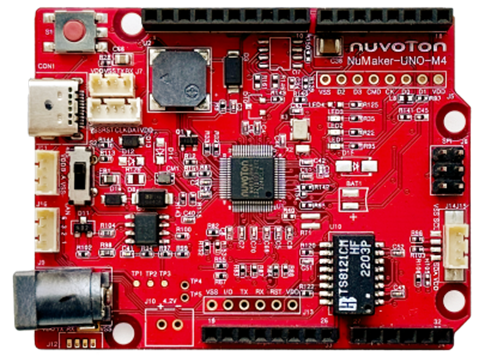
Key Features Overview
ØComprehensive Development Tools: Providing all-around support for learning, application, and debugging.
ØIndustrial communication interfaces: Built-in Ethernet, RS485, CAN bus.
ØMulti-application support: Compatible with industrial applications such as Modbus RTU/TCP, CAN, MQTT, and more.
ØPowerful data processing: Equipped with 1024 KB Flash and 512 KB SRAM, and supports SD card for long-term data logging.
ØNetwork connectivity: Supports wired networks and can be expanded with WiFi/Sub-GHz wireless modules.
ØArduino Ecosystem Compatibility: Compatible with Arduino IDE and Arduino UNO R4 pins, allowing for the expansion of various Shield boards.
ØHardware-friendly design:
Lightweight and portable development kit.
Equipped with a RESET button and LED status indicators for power, I/O, UART, and SPI.
Supports flexible power supply options with USB VBUS and external DC jack (8V-18V).
ØEnhanced peripheral functions: Integrates ADC, PWM, I²C, SPI, UART, and other commonly used microcontroller peripherals.
Application scenarios and development directions
ØInternet of Things (IoT) applications
ØSmart Factory Automation
ØRemote monitoring system
ØIndustrial control and automation
ØPower Monitoring System
ØSmart Agriculture System
ØAutomated retail system
Hardware Description
Arduino is an open-source electronics platform based on easy-to-use hardware and software. The Nuvoton NuMicro NuMaker-UNO-M4 evaluation board is an Arduino-compatible board that uses the NuMicro microcontroller (MCU). Its functionality can be expanded through Arduino extension boards, and users can develop their own applications using the Arduino IDE while leveraging a large number of open-source examples.
The NuMaker-UNO-M4 is a dedicated development tool for the NuMicro M467SJHAN, allowing users to easily develop and validate applications. It is designed to provide a platform for development and learning. Equipped with peripherals such as ADC, PWM, I²C, SPI, and UART, users can configure the NuMaker-UNO-M4 development kit according to specific needs or expand its functionality with additional peripheral devices. The NuMaker-UNO-M4 is compatible with the Arduino UNO R4 development board.
The NuMaker-UNO-M4 evaluation board offers the following features:
Ø Provides comprehensive development tools for learning, application, and debugging.
Portable development and debugging toolset
Rich MCU peripheral features, such as ADC, PWM, I²C, SPI, and UART.
Ø High scalability, capable of connecting different application modules.
Supports and is compatible with Arduino UNO R4
Supports USB virtual COM port (VCOM)
Ø Supports Arduino IDE, IAR EWARM, and Keil RVMDK integrated development environments
Flexible circuit board power supply
Ø LED indicator light
Ø Reset (RESET) button
Front view
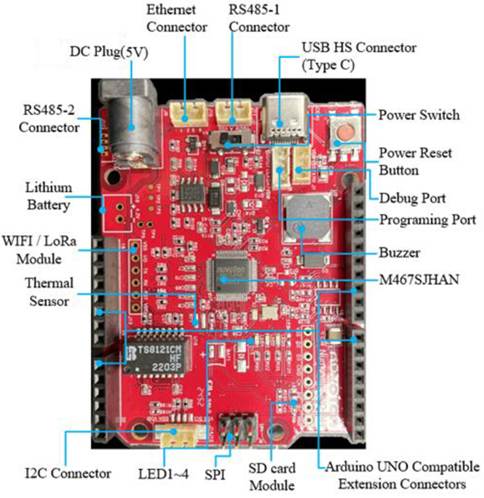
The front view of the NuMaker-UNO-M4 includes the following main components and connectors:
Ø Target chip: M467SJHAN
Ø USB HS connector
Ø Arduino UNO compatible expansion connector
Ø External VDD power connector
Ø External VSS power connector
Back view
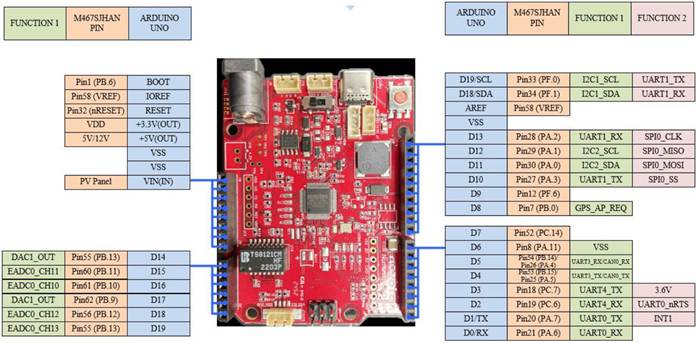
The main components on the back of the NuMaker-UNO-M4.
Ø Ethernet chip: RTL8201FI
Arduino UNO compatible expansion connection
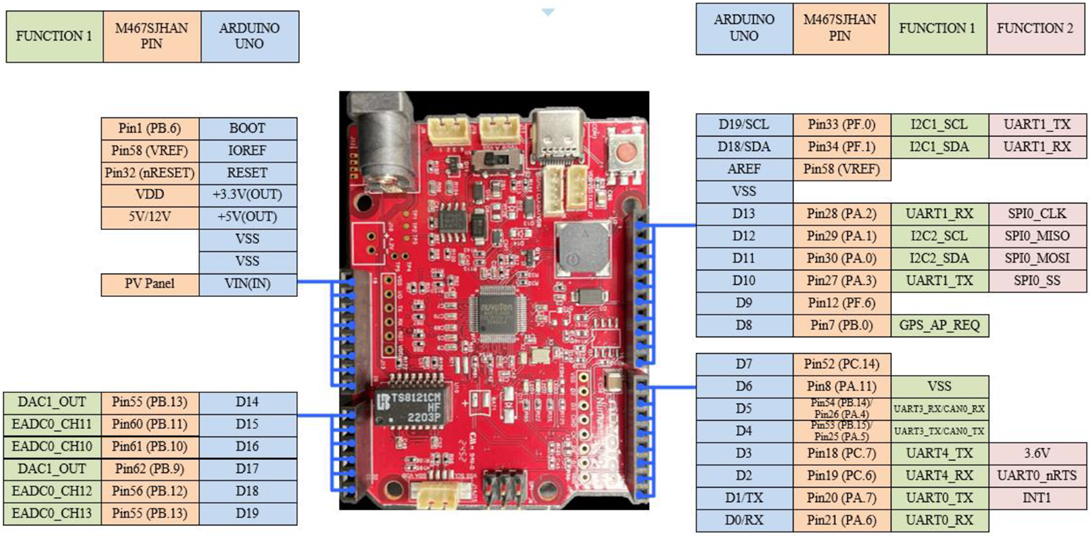
Arduino UNO Expansion Connection and M467SJHAN Pin Correspondence Table
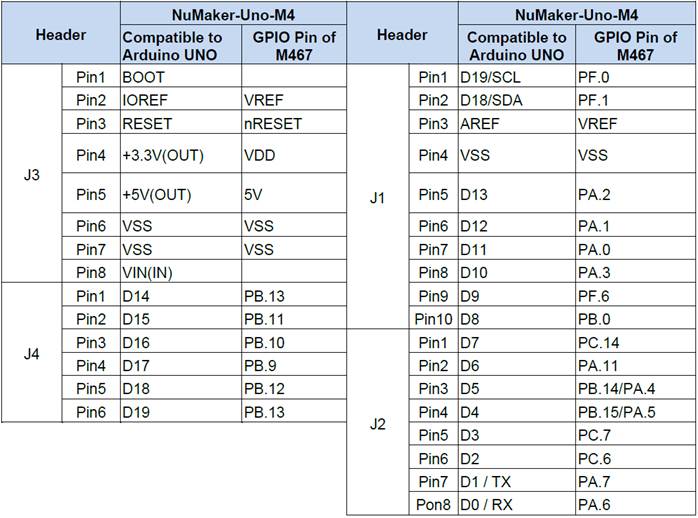
【Arduino IDE and Development Board Installation Guide
Download and install the Nu-Link USB driver.
http://www.nuvoton.com/opencms/resource-download.jsp?tp_GUID=SW0520150729202535
- From the official websitehttps://www.arduino.cc/en/Main/SoftwareDownload and install the Arduino IDE development environment.
- Run the installer to install the Arduino IDE on your computer.
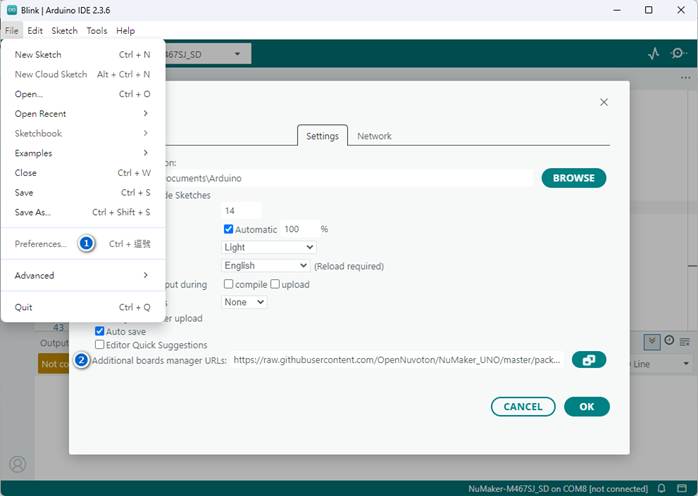
- Open Arduino IDE, then click on 'File' → 'Preferences'.
Copy and paste the following URL into the 'Additional Boards Manager URLs' field:https://raw.githubusercontent.com/OpenNuvoton/NuMaker_UNO/master/package_nuvoton_index.json
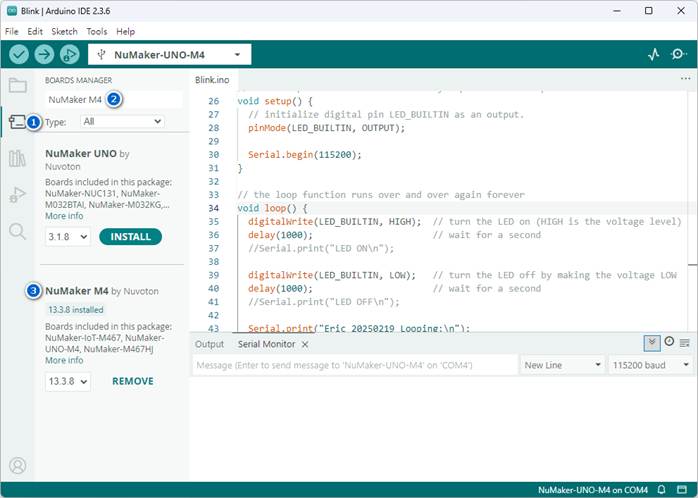
Click "Tools" → "Board" → "Boards Manager", type "NuMaker M4" in the search box and click "Install" NuMaker M4.
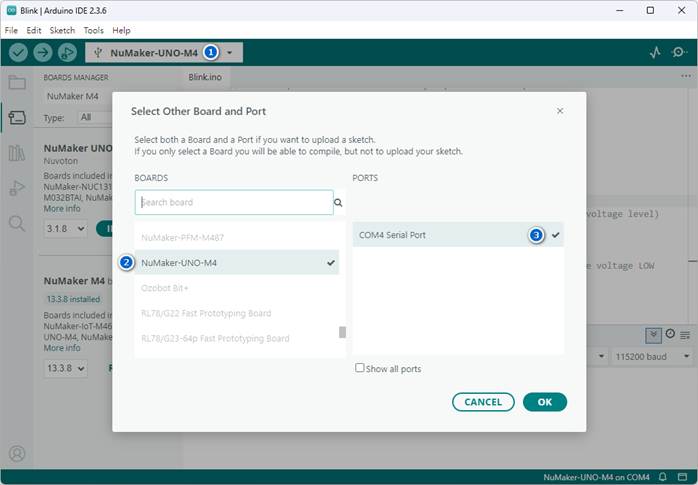
After the installation is complete, click on 'Tools' → 'Board' again, and you will find and select 'NuMaker-UNO-M4' from the list to start using it.
*Note: Please ensure that your network connection is functioning properly and is not being blocked by a firewall or antivirus software to avoid download failure.
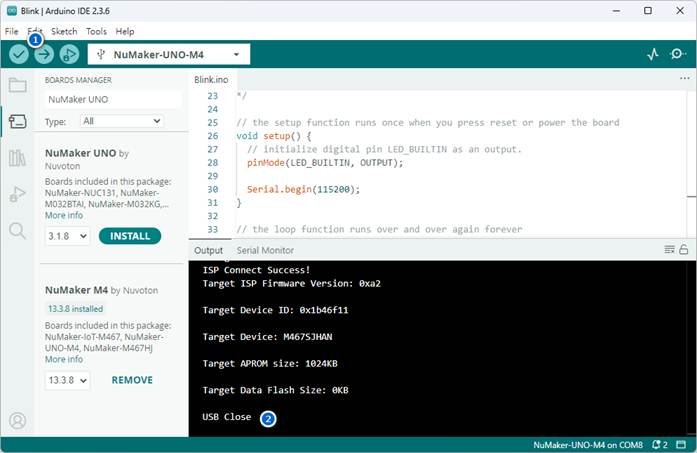
Compile (Verify) and upload (Upload) the Arduino program (.ino) to the NuMaker-UNO-M4 development board and execute it.
Refer to relevant resources
Øhttps://www.nuvoton.com/products/iot-solution/arduino-compatible-platform/numaker-uno-m4/